

AI Dog Dance Generator
Turn one clear photo of your dog into a short, share-ready dance clip with this AI dog dance generator. It keeps the familiar studio tool above — upload, pick a dance, generate — and adds the context you need before you hit create.
Upload a front-facing photo, choose one of six built-in dances, and generate with your existing credits. No separate tutorial page. No per-dance landing URLs. Just the tool you already use, wrapped in clear guidance for people who want a hands-on generator on this page.
How the AI dog dance generator works
Upload a photo of your dog.
Use a sharp, well-lit shot where the face and upper body are easy to see. Front-facing or three-quarter angles work best. Avoid heavy filters, tiny distant subjects, or group shots where your dog is hard to pick out.
Pick a dance template.
Choose from the six dances already in the studio: Gangnam Style, Single Ladies, Don't Play With Me, YMCA, Ophelia, and Last Call for Love. Each template drives the motion look; you stay on this same
/createpage — we do not open a new URL per dance.Generate and download.
Tap generate, wait for the clip, then preview and download when you are ready. Credits work exactly as they already do in BoogiePaw Studio — this page does not change pricing or credit rules. Sign in if you need to manage credits or continue a session.
That is the whole loop: photo in, dance on, clip out. If you want more style ideas later, come back to the same tool and try another template.
Dance templates on this page
All six templates live inside the studio above. Use this list as a quick map — not as separate pages.
- Gangnam Style — upbeat, playful energy for social posts and “look what my dog can do” moments.
- Single Ladies — sharp, confident choreography that reads well in short vertical clips.
- Don't Play With Me — upright, high-energy moves with a paws-up beat, made for short vertical clips.
- YMCA — classic, recognizable moves that land with family audiences and party contexts.
- Ophelia — smoother, more expressive pacing when you want a softer mood.
- Last Call for Love — dramatic flair for birthday edits, pet tributes, and shareable finales.
Pick one template per generation. You can run another generation later with a different dance. We intentionally do not publish six template landing pages; ranking and discovery for this tool stay on /create.
Single Ladies Dog Dance
Your dog, doing the Single Ladies dance — from one photo. It is the dance most BoogiePaw owners choose, so it is already selected in the studio above. Upload a clear photo, keep Single Ladies picked, and generate.
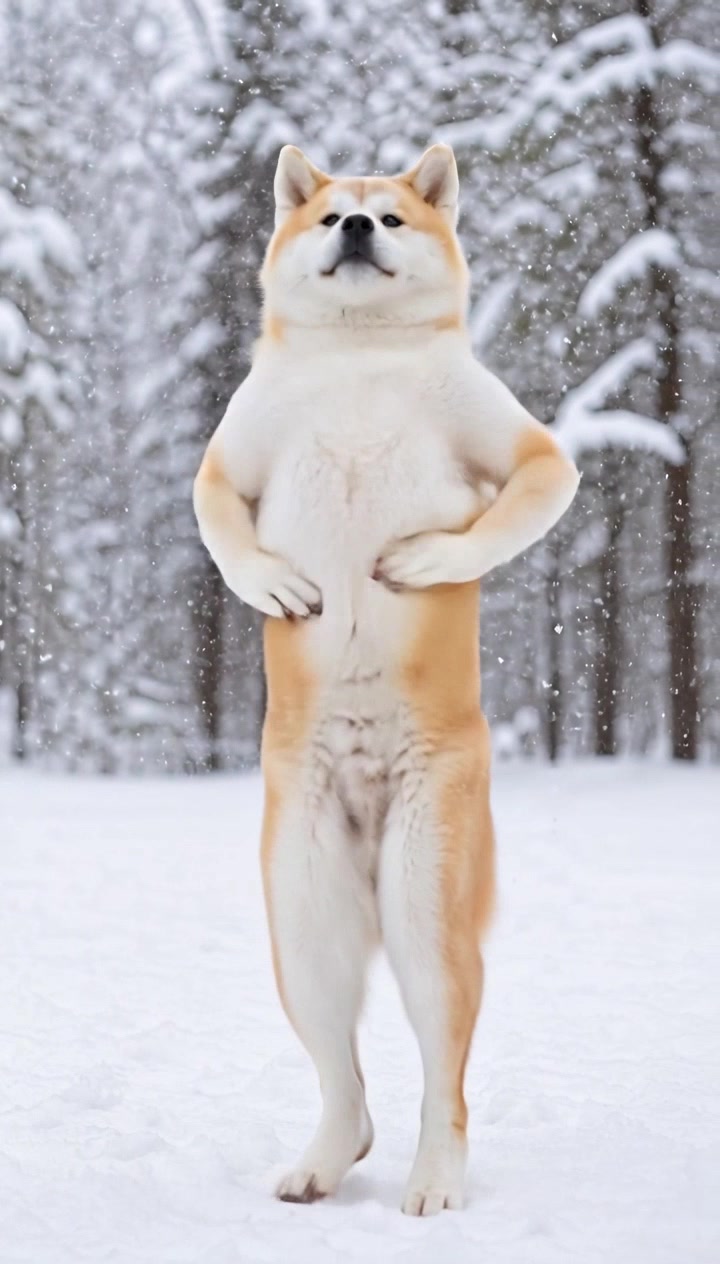
What you get is a 10-second, 9:16 vertical clip of your own dog: it stands up on its hind legs, raises a paw for the signature hand flip, then sways and turns to the beat, with the template's soundtrack added after generation. The motion follows our own Single Ladies template clip — a dog dancing solo — so it is not a frame-by-frame copy of any music video and there are no backup dancers. Results vary with your photo; a sharp, full-body shot gives the model the most to work with.
Which dogs look best
Composed, upright breeds tend to carry this routine well — shiba inu, akita, German shepherds and similar builds — but any dog with its face and front legs clearly visible can try it. A front-facing or three-quarter photo on a plain background works better than a busy scene.
Length, quality and cost
Every Single Ladies clip is 10 seconds and costs 20 credits, the same as the other dances. Videos made with your free welcome credits render at 480p; buying any BoogiePaw credit pack unlocks 720p HD. If a generation fails for a technical reason, the credits come back automatically.
When people use this tool
Pet owners and creators reach for BoogiePaw when a still photo is not enough and a full video shoot is too much. Browse dance previews on the BoogiePaw homepage.
Birthday and holiday cards
Drop a favorite portrait into a dance clip, then send it in a group chat or attach it to a digital card. A short loop often gets more replies than a static image.
Social teasers
Need a hook for TikTok, Reels, or Shorts? Generate a few seconds of motion from one photo, add text on your phone, and post. The studio is built for that “one photo → one clip” pace.
Adoption and shelter storytelling
Shelters and fosters sometimes need light, shareable moments without staging a full shoot. A clean dance clip from an existing photo can sit next to a serious adoption post without replacing it.
Just for fun at home
Many people simply want to see their dog “dance” once. Upload, pick YMCA or Gangnam Style, generate, laugh, and save. That is a valid use of the studio.
Whatever the scene, start with a clear photo and one template. Extra polish (captions, stickers, music beds) belongs in your phone editor after download.
FAQ
What is an AI dog dance generator?
An AI dog dance generator takes a still photo of a dog and produces a short video where the dog appears to perform a choreographed dance. On BoogiePaw, you upload a photo, choose one of six dance templates, and generate a clip with your studio credits — all on this /create page.
Do I need a video of my dog, or is one photo enough?
One clear photo is enough. You do not need a reference dance video or a multi-angle shoot. Better lighting and a visible face improve results, but the product is photo-first by design.
Which dances can I choose from?
The studio includes Gangnam Style, Single Ladies, Don't Play With Me, YMCA, Ophelia, and Last Call for Love. All six sit in the template picker above. We do not split each dance onto its own URL.
Can my dog do the Single Ladies dance?
Yes. Upload one clear photo and keep the Single Ladies template selected in the studio above (it is the default). BoogiePaw generates a 10-second vertical clip of your dog standing up, raising a paw and swaying to the routine — no video of your dog needed.
Does the Single Ladies dog video have music?
Yes. The video is generated silently and the template's soundtrack is added afterwards, so the downloaded MP4 plays with sound. Each clip is 10 seconds, 9:16, and ready to post to TikTok, Reels or Shorts.
Which dogs look best doing the Single Ladies dance?
Dogs with a calm, upright posture — shiba inu, akita, shepherds — tend to look the most natural, but any breed works if the photo shows the face and front legs clearly. Results vary with the photo.
How do credits work on this page?
Credits follow the same BoogiePaw Studio rules you already see in the tool. This landing content does not change prices, packs, or payment flows. If you are low on credits, sign in and use the existing credit UI.
Is this different from the BoogiePaw homepage?
Yes in intent, no in brand. The homepage targets broader “AI dog dancing” discovery. This /create page is the hands-on generator experience — tool first, with supporting copy below so searchers land on a usable page.
Can I use the clips commercially?
Check BoogiePaw’s terms for commercial and redistribution rules before you run ads or sell merch with generated clips. For personal sharing and social posts, follow the same guidelines you use for other studio outputs.
Will you add more dances or a separate tutorial site?
New templates may appear inside the same picker over time. We are not launching a separate how-to URL or six per-dance landings in this release. How-it-works stays on this page as the three steps above.
Ready to create?
Scroll back to the studio tool at the top of this page. Upload your dog’s photo, pick a dance, and generate. If you need an account or credits, use the existing sign-in and credit controls in the tool — no new checkout path on this page.
Back to the studio tool